Many online casino players in the Philippines rely on GCash and PayMaya for deposits and withdrawals. However, transferring funds between these e-wallets involves fees and specific rules that users should understand in advance.
In this article, we provide a clear, step-by-step guide to transferring money from PayMaya to GCash, along with details on fees, transfer limits, and key points to watch out for.
By following this guide, even first-time users can complete a Maya to GCash transfer smoothly and with confidence.

Once you register with bet88 and complete the conditions, the bonus can be received directly in GCash, without the need to move funds from Maya.
How to Claim Your Exclusive GCash Bonus – Click to Open
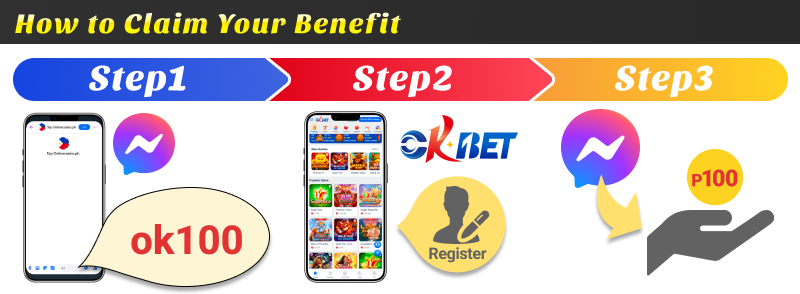
Prize: ₱100
- Register for OKBET through our site
- Send the bonus code “ok100” to our official Messenger
- Complete the required conditions
Once you have registered, please send us your bonus code via our official messenger.
PayMaya to GCash Transfer Guide – Step-by-Step Instructions
We’ll clearly explain the steps for transferring funds from PayMaya to GCash, complete with illustrations.
Let’s walk through it together using actual screenshots.
1. Open the app and log in
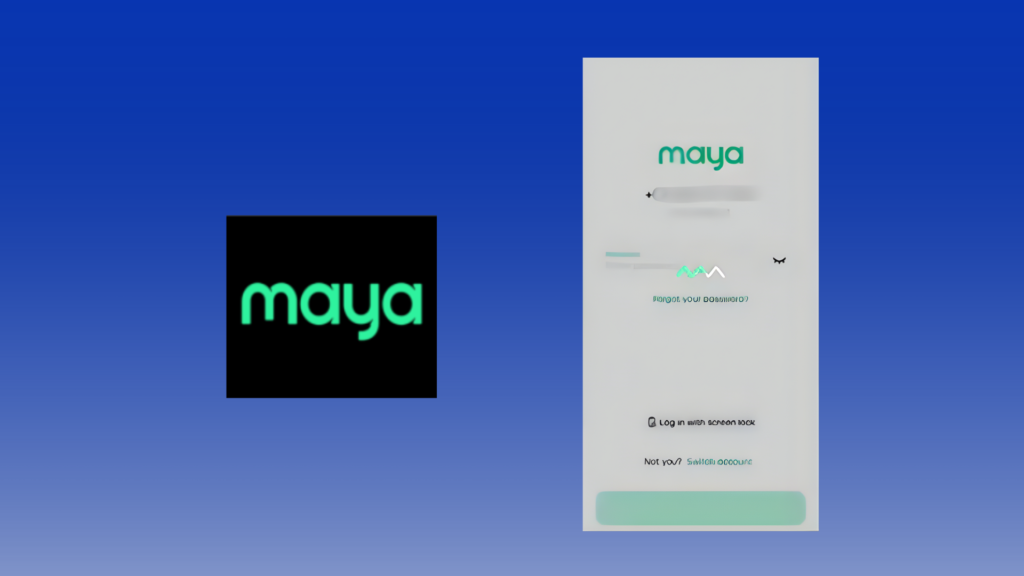
Tap to open the PayMaya app installed on your smartphone.
The PayMaya app is available for iOS and Android.
Follow the on-screen steps to enter your mobile phone number and password to log in.
2. Tap “Bank Transfer”
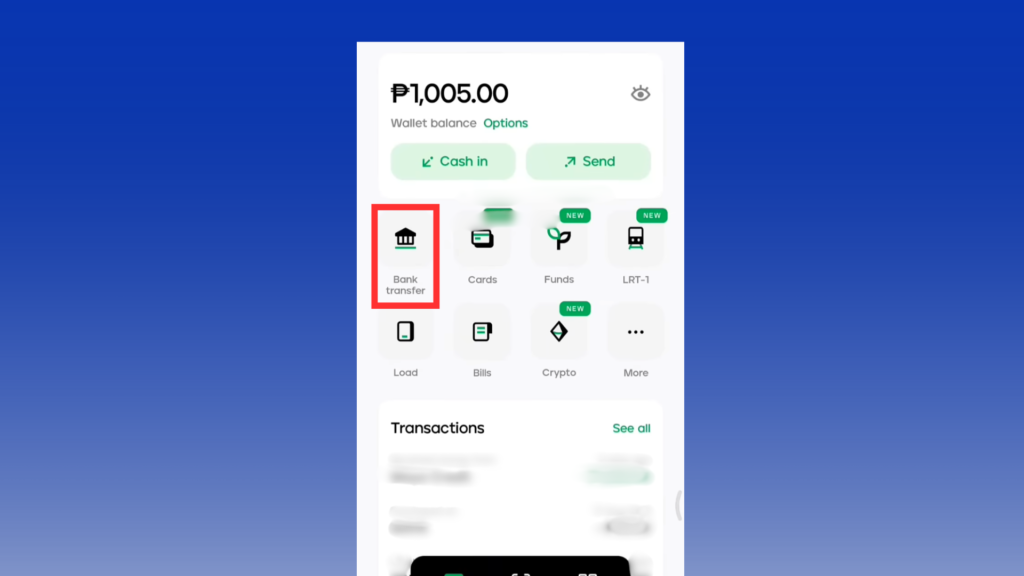
The app’s main screen displays your current PayMaya balance.
Here, you can see the amount available to transfer from PayMaya to GCash.
To send money to GCash, tap “Bank Transfer” in the center of the screen.
To use the transfer feature, you need to verify your identity first.Please check this guide for the step-by-step process.
3. Select “G X-change Inc./GCash” from the list
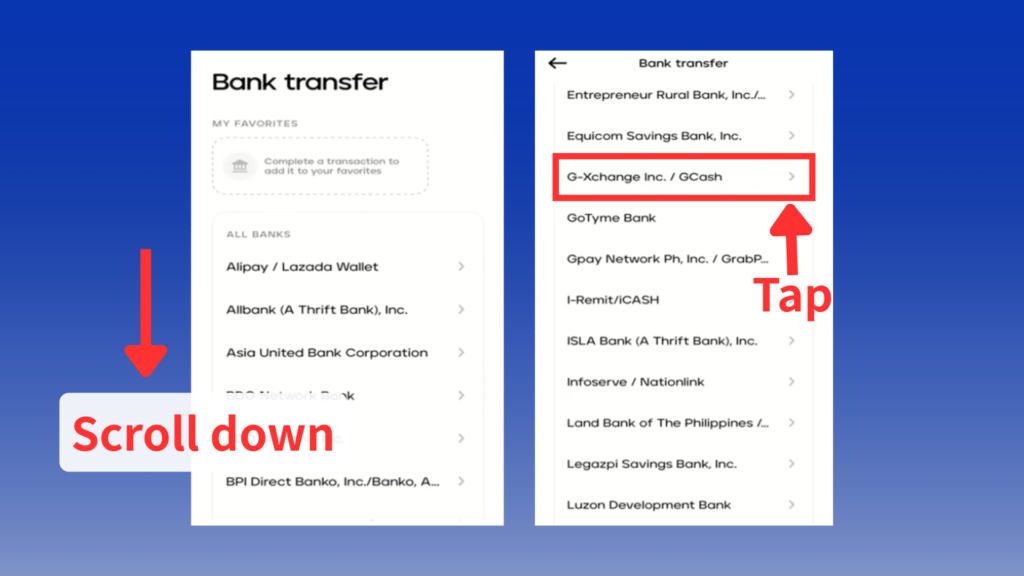
Find the GCash recipient in the list.
It’s sorted alphabetically, so scroll down and tap “G X-change Inc./GCash”.
4. Fill in the required fields and tap “Continue”
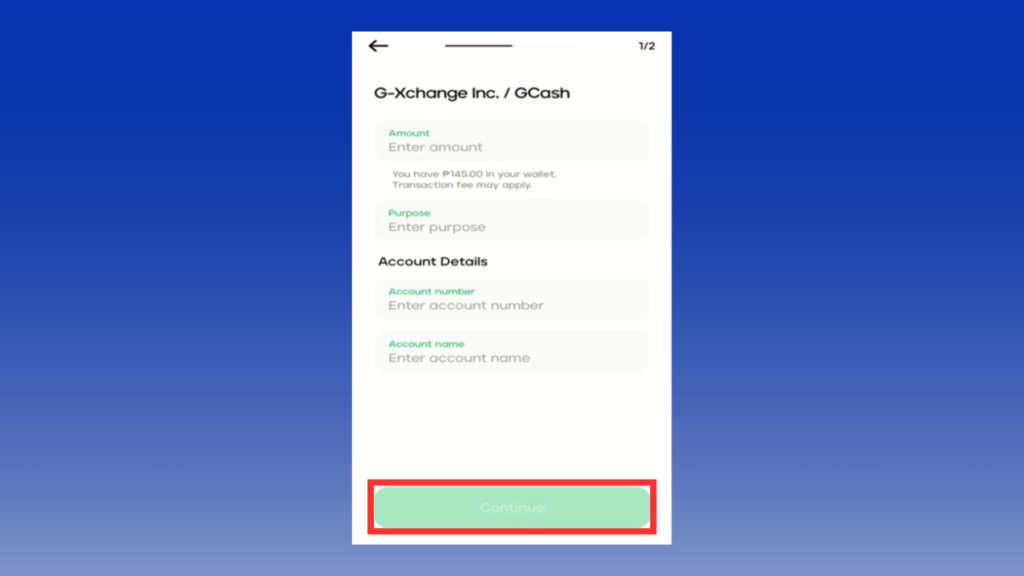
Complete the following fields:
- Amount
- Purpose
- Account number: Your GCash account mobile number
- Account name: Your GCash account name
The transferable amount ranges from ₱1 to ₱50,000. Each transfer costs ₱15.
The monthly limit varies by account tier, but the amount transferable per transaction remains the same.
If you wish to send more than ₱50,000, you must split the transfer into multiple transactions.
5. Review the transfer details
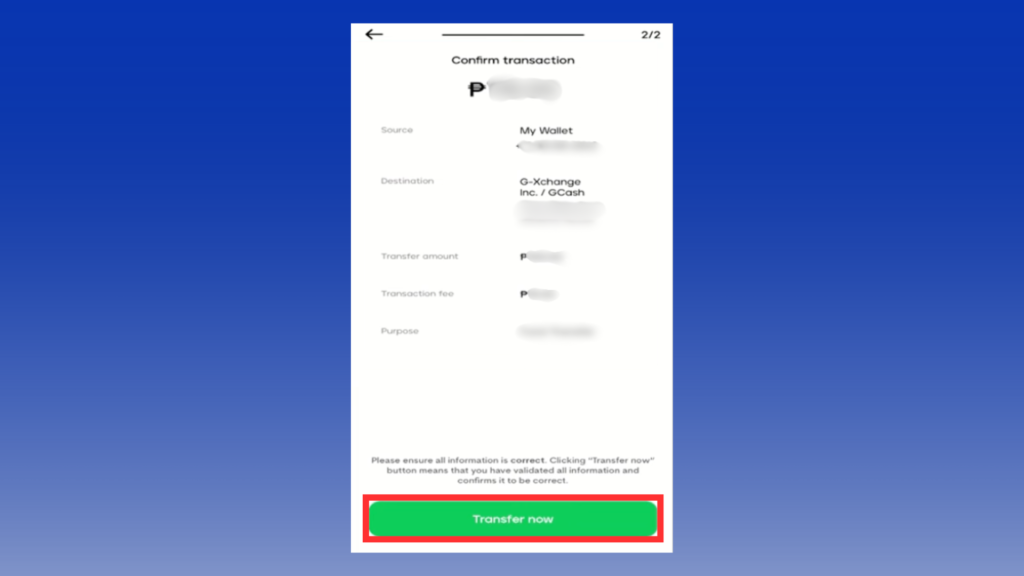
When this screen appears, please perform a final review of the transfer details.
The recipient, the amount, and the total with fees will be shown.
Check that everything is correct, especially the phone number and the amount.
If everything looks good, proceed to the next authentication step.
6. Enter the verification code and tap “Verify”
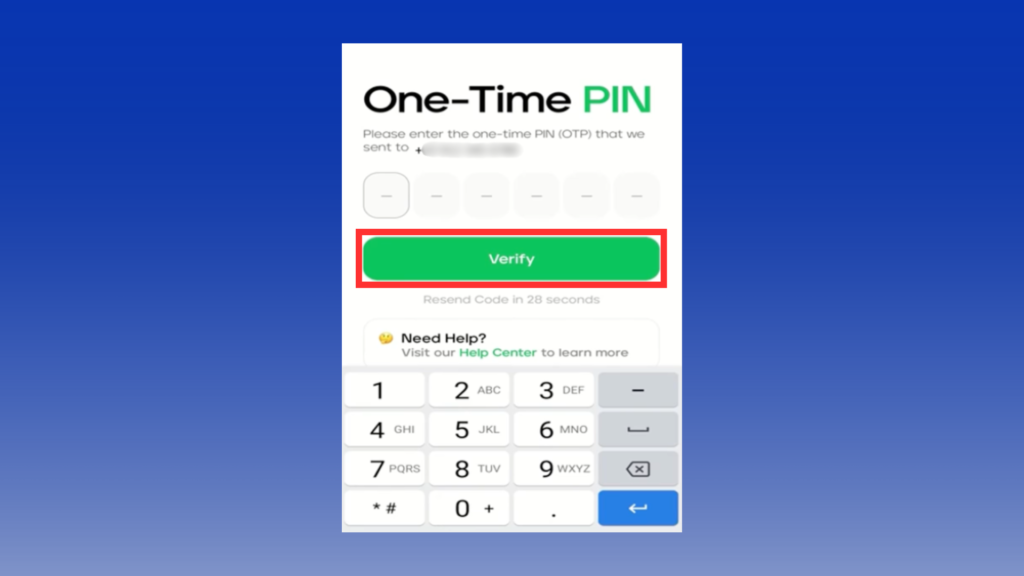
A One-Time PIN will be sent to your mobile phone number.
Enter this 6-digit code on the PayMaya app screen and tap “Verify” to confirm the transfer.
The code expires quickly, so enter it right away when you get the message.
7. Transfer Complete
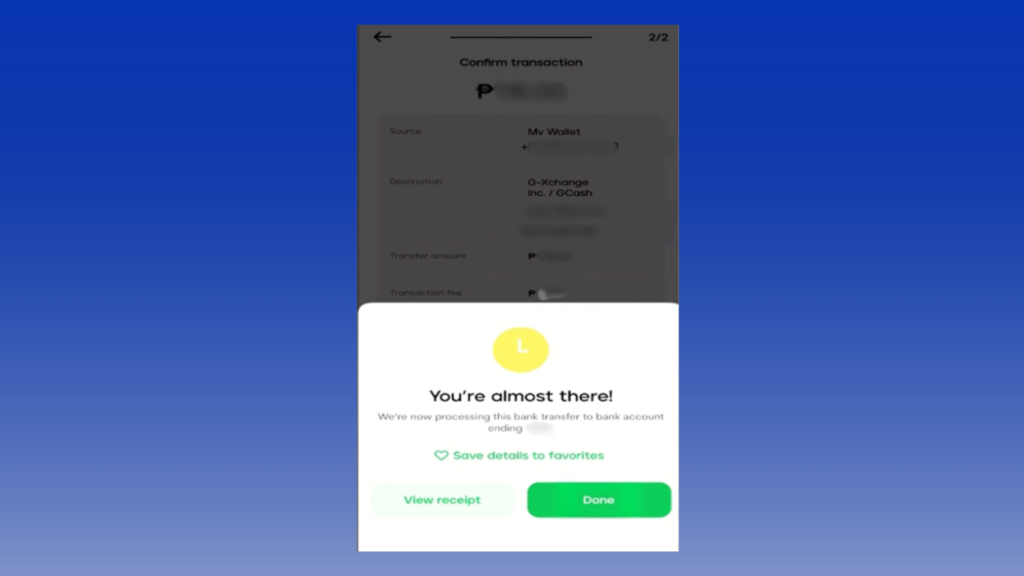
This screen indicates the transfer is nearly complete.
While PayMaya doesn’t specify transfer speeds to GCash, using Insta Pay typically completes transfers within minutes. Open your PayMaya or GCash app to confirm the transfer is finished.
PayMaya to GCash: 3 Key Points for Smooth Transfers
To send money smoothly from PayMaya to GCash, it is important to prepare ahead and check the basics.Check your account verification, make sure the recipient information is correct, and remember the transfer fees.Preventing transfer errors and delays enables seamless usage.
Be careful if this is your first time sending money from PayMaya to GCash, or if you are not familiar with the fees.
Ensure Your Account is Verified
When sending money from PayMaya to GCash, the first thing to check is your account verification status.
If identity verification is not complete on PayMaya or GCash, you may not be able to send money.
This is especially likely to cause problems when moving larger sums for online casino transactions. Fully verify your account with a valid ID before sending money.This helps prevent errors and saves you from doing the process again.
If you want smooth transfers, don’t skip the verification step.
Enter the recipient’s information correctly
One common issue with PayMaya to GCash transfers is mistyping the recipient’s details. If you enter the wrong GCash mobile number, the transfer may fail.In the worst case, the money could be sent to someone else.
When sending money from PayMaya to GCash, always double-check the recipient’s phone number and name.
Once a transfer is completed, it is generally impossible to cancel it.
Be especially cautious when sending to someone for the first time or if you manage multiple accounts under your name.
Keep enough balance for PayMaya-to-GCash fees.
Sending money without accounting for the PayMaya to GCash fee may result in an error due to insufficient funds. When sending money from PayMaya to GCash, a ₱15 transfer fee applies.
Therefore, if your balance is only the amount you wish to send, the transaction will not proceed.
Ensuring you have sufficient funds, including the fee, beforehand prevents transfer failures.
If you send money often or want to do it quickly, keep some extra balance in your account.
Frequently Asked Questions About PayMaya to GCash Transfers
Finally, here are some frequently asked questions regarding Maya to GCash transfers.
How quickly can I transfer from PayMaya to GCash?
PayMaya to GCash transfers primarily use Insta Pay. Transfers via Insta Pay typically reflect in GCash instantly or within minutes.
However, processing times may be longer during maintenance periods or when the app is busy.
If it takes longer than expected, contact official support to check.
PayMaya to GCash Transfer Fees: How Much Does It Cost?
The fee for transferring from PayMaya to GCash is ₱15. This is the basic fee for transfers between PayMaya and GCash, taken apart from the sent amount.
If your PayMaya balance is not enough, the transfer may fail.Because each transfer has a fee, sending money many times can cost more.
Consider consolidating transfers whenever possible for a more efficient option.
Are there any steps I should take before sending money?
Ensure your account is upgraded. Transfers from PayMaya to GCash are not possible with a Basic account.
To ensure seamless transfers, follow these steps to upgrade your account:
- Log in to your PayMaya account
- Tap Profile
- Select “Upgrade Account”
- Fill in required details and prepare a valid primary ID
- Record and submit a video selfie
- Enter mandatory information
- Review your application and tap “Submit”
You will receive a confirmation email via SMS within 24 hours of approval. Your account status will also display “Upgrade Approved” at the top.
Is there a limit on the amount I can send?
PayMaya imposes limits on sending money. Regardless of your account upgrade, the maximum per transaction is ₱50,000.
PayMaya has restrictions on Bank Transfer, and the conditions vary depending on your account type.
| Account Types | Basic | Upgraded | Super Users | Ultimate Users |
|---|---|---|---|---|
| Bank Transfer (InstaPay Sending) Monthly Limit | ✕ | ・₱50,000 Daily Limit ・₱100,000 Monthly Limit ・40x a month | ・₱50,000 Daily Limit ・₱500,000 MonthlyLimit ・80x a month | ・₱50,000 Daily Limit ・₱5,000,000 Monthly Unlimited Number of transactions |
Source: Maya Official Website
The table also lists limits for receiving funds from other PayMaya users. Check the limits and rules before you send money.
Comparing PayMaya and GCash – Which is easier to use in the Philippines?
PayMaya and GCash are known as leading electronic payment services in the Philippines. Both support money transfers and payments, but they differ in their user base and usage patterns.
PayMaya has digital banking features and is becoming popular, especially with young people.GCash is a popular e-wallet and is used by many people in the country.
We’ll compare their features and explain them in detail.
PayMaya – Gaining Popularity Among Younger Generations
PayMaya is a digital wallet and digital banking service. Its usage is expanding, particularly among younger generations.
Beyond basic functions like money transfers and payments, it offers savings accounts, loans, and debit card functionality. Its key feature is providing services similar to a bank through a single app.
For people who often use cashless payments, a service that manages money in one place is convenient.
Its relatively simple UI also makes it intuitive for first-time users of digital payment apps. Frequent campaigns and cashback offers make it a user-friendly service for younger, digitally savvy generations.
However, fewer shops and people use it compared to GCash.Because of this, some users feel it is not the best main payment app.
For online casinos that accept Maya, please refer to the article below.
Information about Maya Online Casinos
GCash is the most widely used electronic payment service in the Philippines.Because many people and shops use it, it is often used in malls, restaurants, bill payments, and sending money to others.
People trust GCash because it works almost everywhere and is easy to use every day.
Its particular strengths lie in the ease and prevalence of peer-to-peer transfers. Knowing just a mobile number allows simple transfers, making it frequently used for family and friends.
Many online and overseas services support GCash, so it is easy to use for online casinos and shopping sites.
On the other hand, because it has many features, some people feel it is a little hard to use or that support takes time.However, because it is easy to use and many people use it, it is still the No. 1 e-payment service in the Philippines.
For online casinos that accept GCash, please refer to the article below.
Information about GCash Online Casinos

Must-Read for Online Casino Users: Key Points When Transferring Funds from PayMaya to GCash
Smooth fund transfers are essential when playing at online casinos. Before sending money from PayMaya to GCash, make sure your account is fully verified and always double-check the recipient details to avoid transfer errors.
Each PayMaya to GCash transfer comes with a service fee, so keeping sufficient balance in your account is important. Preparing your PayMaya account in advance helps ensure hassle-free transactions when funding online casino play.
Once your transfer setup is ready, you can focus on enjoying your online casino experience with greater convenience.
We’re currently offering a limited-time ₱100 GCash bonus exclusively through our site.
To learn how to claim this bonus, tap the link below.
Sign up for bet88 via the link below to claim a ₱100 bonus.
Our exclusive GCash bonus allows fast withdrawals, making it a great option for players who want quick access to their rewards.
How to Claim Your Exclusive GCash Bonus – Click to Open
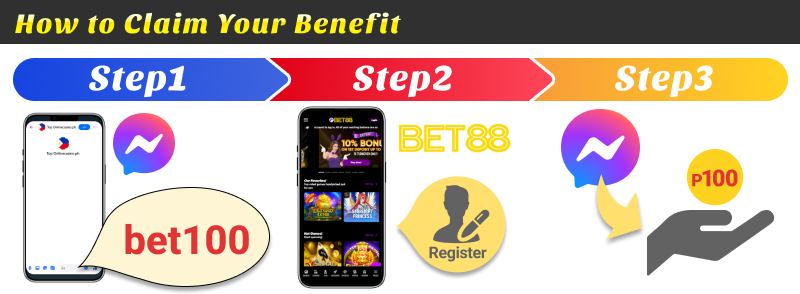
Prize: ₱100
- Register for BET88 through our site
- Send the bonus code “bet100” to our official Messenger
- Complete the required conditions
Once you have registered, please send us your bonus code via our official messenger.
UPDATE HISTORY
・01.28.2026: Updated bonus information